How to Register at SpinSamba Casino
Ready to join the action? Before you can hit the reels or chase that progressive jackpot, you need an active account. The signup process at Spin Samba is built for speed - three quick steps and you are in. No complicated paperwork, no endless forms. Just straight-up registration so you can get to the good stuff.
How to Create a SpinSamba Account
Here is the exact walkthrough for setting up your player profile. Follow these steps and you will be spinning within minutes.
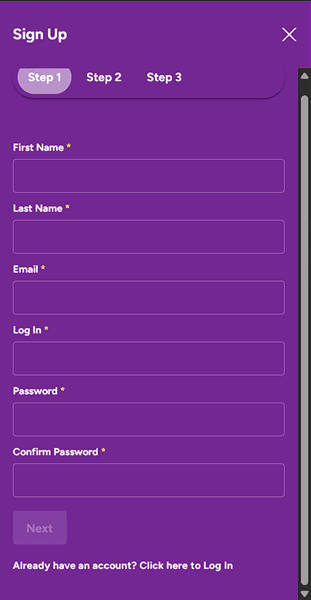
Step 1: Account Details
- The first screen asks for your basic login information.
- First Name: Enter your first name.
- Last Name: Enter your last name.
- Email: Enter a valid email address.
- Log In: Choose a username for your account.
- Password: Create a secure password.
- Confirm Password: Type the password again to verify it.
- Click the "Next" button to proceed.
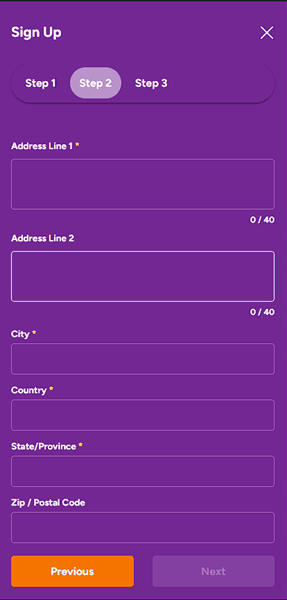
Step 2: Address Information
- The second screen requires your residential address.
- Address Line 1: Enter your street address (Required).
- Address Line 2: Enter apartment or suite number (Optional).
- City: Enter your city.
- Country: Select or enter your country.
- State/Province: Enter your state or province.
- Zip / Postal Code: Enter your postal code.
- Click the "Next" button. (You can use the "Previous" button to go back if you need to change anything).
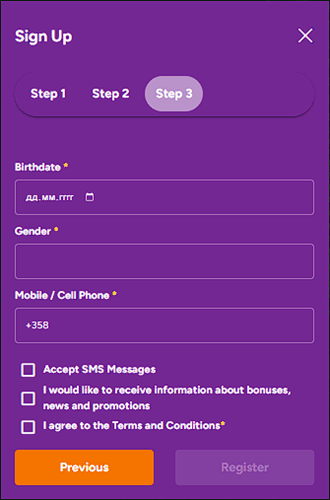
Step 3: Personal Details & Finalization
- The final screen asks for personal verification and agreement to terms.
- Birthdate: Enter your date of birth (Format: DD.MM.YYYY).
- Gender: Select your gender.
- Mobile / Cell Phone: Enter your phone number.
- Optional Checkboxes:
- Check "Accept SMS Messages" if you want text alerts.
- Check "I would like to receive information..." if you want promotional emails.
- Required Checkbox: You must check the box that says "I agree to the Terms and Conditions".
- Click the "Register" button to complete your signup.
Login vs Sign-Up Differences
New around here? Sign-up is where you create your player profile and unlock the welcome package. Login is your daily entry ticket when you already have skin in the game. Think of sign-up as buying into the tournament, and login as taking your seat at the table.
If you have never deposited here, you need to register first. Once your account is live, the spinsamba login button becomes your fast pass back to the lobby, bonuses, and cashier. Keep it simple: no account yet means sign-up. Existing bankroll means login.
Account Verification Requirements
Here is the reality check every player needs. Before your first withdrawal clears, Spin Samba runs KYC - Know Your Customer. That means uploading a valid ID and proof of address. It is standard across every legit Curacao casino, and it protects your bankroll from fraud.
Most verifications clear within 24 to 72 hours if your docs are crisp and readable. Skipping KYC is not an option, so knock it out early and avoid payout delays later. The casino may also request payment method verification depending on how you deposit. Get verified once, play without headaches forever.
How to Log In to SpinSamba Casino
Already part of the Spin Samba crew? Logging in takes under ten seconds. Whether you are on a desktop rig or tapping away on your phone, the portal is optimized for instant access. Below is the complete breakdown so you can get back to spinning without any friction.
Desktop Login Steps
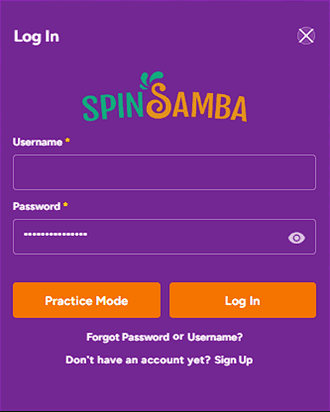
Fire up your browser and head to the official site. The spinsamba casino login form sits right on the homepage. Here is exactly how to punch in:
- Enter Username: In the first box labeled Username, type the username you created during the registration process.
- Enter Password: In the second box labeled Password, type your account password. Tip: Click the small "eye" icon inside the password box if you want to reveal the text to check for typos.
- Choose Your Mode: You have two options depending on how you want to play:
- To play with real money: Click the orange Log In button on the right.
- To play for free (Demo): Click the orange Practice Mode button on the left. This allows you to try games without using real funds.
Troubleshooting & New Users: Forgot Credentials? If you cannot remember your login details, click the link that says "Forgot Password or Username?". New Account? If you do not have an account yet, click the link at the very bottom that says "Don't have an account yet? Sign Up".
Mobile Browser Login
No app needed. The mobile site is built on HTML5, so it adapts perfectly to any screen size. Whether you are on iOS or Android, just open your browser, punch in your credentials, and the lobby loads fast.
The spinsamba casino login experience on mobile is smooth - menus collapse neatly, games scale to fit, and the cashier works exactly like the desktop version. Perfect for spinning a few rounds during your commute or firing up a live dealer table from your couch. All features, bonuses, and withdrawal options are fully accessible on mobile.
Saved Credentials and Auto-Login
Most modern browsers let you save your username and password. Enable it if you are on a private device - it shaves seconds off every session. Just do not use auto-login on shared or public computers. Your account holds real funds, so treat it like your banking app.
For extra speed, add the login page to your home screen as a shortcut. This creates a one-tap gateway straight to your account. Pro tip: clear saved credentials if you ever sell or give away your device. Security always beats convenience when real money is on the line.
Forgot Your Password or Username? Reset Guide
It happens to the best of us. You go to log in and your mind goes blank. No stress - Spin Samba has built-in recovery tools that get you back in the game fast. Whether you forgot your password or your username entirely, this section has you covered.
Step-by-Step Password Recovery Process
Follow these steps to reset your password and reclaim your account:
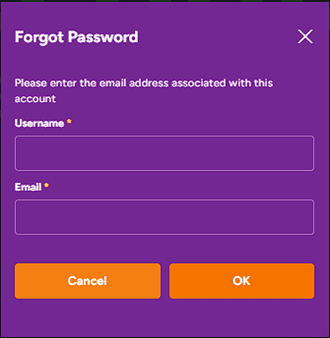
- Enter Username: In the field labeled Username, type the username associated with your account.
- Enter Email: In the field labeled Email, type the email address that you used when registering your account.
- Submit Request: Click the OK button to submit your password recovery request.
- Check Your Email: You should receive an email with instructions on how to reset your password. Follow the link in that email to create a new password.
Options: Cancel - If you clicked "Forgot Password" by mistake or remembered your credentials, click the Cancel button to close this window and return to the login screen. OK - Click OK only after you have filled in both the Username and Email fields correctly.
Note: Make sure the email address matches the one on file, otherwise you will not receive the password reset instructions.
How to Recover Your Username
If you forgot your username completely, do not panic. The recovery process is just as simple:
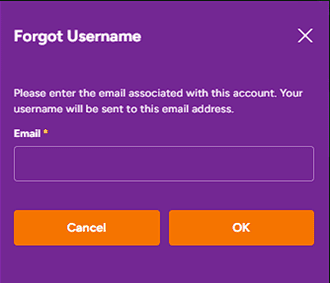
- Enter Your Email: In the box labeled Email, type the email address you used when you originally registered your account.
- Submit the Request: Click the OK button.
- Check Your Inbox: As the instructions on the screen state ("Your username will be sent to this email address"), check your email inbox shortly after clicking OK. You should receive a message containing your username.
Options: Cancel - If you remembered your username or clicked this link by mistake, click the Cancel button to close the window and return to the login screen. OK - Click OK to send the recovery email. Ensure you have typed the correct email address, or you won't receive your username.
Email Verification Timeline
Once you submit a reset request, the email usually lands in your inbox within 2 to 5 minutes. Check your spam or promotions folder if nothing shows up. Gmail and Outlook sometimes filter casino emails into secondary tabs.
If you are still empty-handed after 15 minutes, double-check that you entered the right email address - it must match the one on your account exactly. Still no luck? Reach out to 24/7 live chat and they will sort it out. In most cases, the reset link arrives fast and gets you back to action within minutes.
Tips for Creating a Secure New Password
Do not recycle old passwords. Your new Spin Samba password should be at least 12 characters, mixing upper and lower case letters with numbers and symbols. Avoid obvious picks like your birthday or "password123". Think of it as locking your bankroll in a vault - the stronger the lock, the safer your chips.
Consider using a password manager so you never have to stress about forgetting it again. Never share your login details with anyone, including so-called "account managers" in random chat apps. Spin Samba staff will never ask for your password. Keep it tight, keep it safe, and keep spinning.
Security and Safe Login Practices
Your safety is non-negotiable. Spin Samba runs on industry-grade protection, but smart players also take their own precautions. Here is everything you need to know about keeping your account locked down tight in 2026.
SSL Encryption Confirmation
Every spinsamba login session is protected by 256-bit SSL encryption. That means your data - passwords, card details, withdrawal info - is scrambled before it travels across the web. Look for the padlock icon in your browser address bar. If it is missing, close the tab immediately.
This encryption standard is the same technology used by major banks and financial institutions. It ensures that even if someone intercepts your connection, they cannot read your personal information. Always verify the URL starts with "https://" before entering any credentials.
Licensing and Regulatory Information
Spin Samba operates under a Curacao Gaming Control Board license (OGL/2024/494/0671), operated by Luckland Group B.V. This is not a fly-by-night operation. The license number is verifiable, and the casino has been active since 2015.
While Curacao regulation is not as strict as UKGC, it still enforces fair play, anti-fraud measures, and responsible gambling protocols. The games use certified RNG software, meaning every spin and card dealt is genuinely random. You are playing on a legitimate platform with real oversight.
Two-Factor Authentication Status
As of May 2026, Spin Samba does not offer native two-factor authentication (2FA) on player accounts. This is fairly common among Curacao-licensed platforms. To compensate, use a strong unique password and never share your credentials.
If 2FA becomes available in future updates, enable it immediately - it is the best way to lock down your account. Until then, combining a complex password with safe browsing habits is your strongest defense against unauthorized access.
Anti-Phishing Recommendations
Phishing sites are the oldest scam in the book. They clone the look of real casinos to steal your login details. Always type casino-spinsamba.com directly into your browser. Never click login links from random emails, Telegram messages, or pop-up ads.
Check the URL carefully - fake sites often use typos like "spinsamba-casino.com" or "spinsamba-login.net". When in doubt, contact support before entering your password. Remember: Spin Samba will never ask you to confirm your login details via email or text. If someone does, it is a scam.